

Samsung Galaxy A32 5G Battery Replacement by SHENMZ
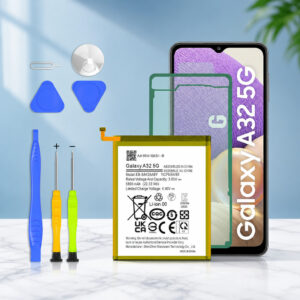
The SHENMZ A32 5G battery is a third-party internal replacement battery for the Samsung Galaxy A32 5G and Galaxy A42 5G. It is advertised at 5,800mAh and 3.85V. The original A32 5G battery is rated at 5,000mAh typical.
This page contains affiliate links. We may earn a commission if you buy through them, at no extra cost to you.
Will This Battery Fit Your Phone?
The listing names the Galaxy A32 5G (SM-A326) and the Galaxy A42 5G (SM-A426). The Galaxy A32 4G is a different phone with a different model family. Run this quick check before you buy.
Fit is listed, but it has not been independently tested on every regional variant. One verified-purchase review on the listing reports a battery that did not fit and would not charge. Match your full model number first, and never force a battery into place.
SHENMZ A32 5G Battery Specifications
| Property | Detail |
|---|---|
| Brand / product | SHENMZ Galaxy A32 5G Battery (Amazon ASIN B0H4G5GZDN) |
| Listed phones | Samsung Galaxy A32 5G, Galaxy A42 5G (SM-A326 / SM-A426 series) |
| Battery family code | EB-BA426ABY (the code used for this phone’s replacement battery) |
| Battery type | Lithium polymer per the listing title and description. The product data field says lithium-ion |
| Advertised capacity | Up to 5,800 mAh |
| Listed voltage | 3.85 V |
| Condition | Advertised as new, “0 cycle” |
| In the package | Battery, adhesive, repair-tool kit |
| Instructions | Not included, per the Amazon Germany listing |
| Manufacturer on listing | Shenzhen Maxpower Technology Co Ltd. |
| Warranty advertised | 12 months (Amazon Germany listing; confirm for your store) |
| Original Samsung battery | 5,000 mAh typical (rated minimum varies by region) |
| Phone charging support | Up to 15W Adaptive Fast Charging |
| Removable by user | No. The phone must be opened |
Capacity, voltage, cycle condition and warranty are listing claims. No independent capacity test was found. Dimensions, weight and safety certification could not be confirmed and are left out. Actual battery life depends on usage and network conditions.
Galaxy A32 5G Battery Replacement Difficulty
This is a moderate repair. Third-party guides estimate 45 to 60 minutes. The back cover is glued on, and the battery is glued to the frame. Most of the effort goes into releasing that glue without damaging anything. Tap a slice to highlight it.
- 25% Opening the back cover & midframe
- 20% Handling small cables & connectors
- 35% Releasing the battery adhesive
- 20% Testing & resealing the phone
Difficulty score and effort split are an editorial estimate. They are based on third-party repair guides that rate the job as moderate and estimate 45 to 60 minutes. They are not an official rating.
How to Replace Your Galaxy A32 5G Battery
Tap each step to tick it off as you go. Typical tools are a Phillips #00 screwdriver, a SIM-eject tool, a suction handle, plastic picks, a plastic card, a spudger, a heat source and isopropyl alcohol. Your kit may not include all of these. Screw counts and cable names differ between guides and phone variants. Follow an illustrated guide for your exact model alongside these steps.
- 1Prepare the phoneBack up your data. Let the battery drop below 25%, then power the phone off.
- 2Open the back coverWarm the back cover evenly until the adhesive softens. Lift a small gap with the suction handle, then cut the adhesive around the edges with a plastic pick or card.
- 3Remove the SIM tray and midframe screwsEject the SIM tray. Remove the Phillips screws that hold the midframe and keep them organized by location.
- 4Release the midframeUnplug the cable attached to the midframe, such as the fingerprint or side-button flex. Work a pick around the edge to free the plastic clips, then lift the midframe off.
- 5Disconnect the batteryUse a spudger to lift the battery connector and the main flex connector. This cuts power to the board before you touch the battery.
- 6Warm the battery adhesiveApply gentle, even heat. Overheating can damage the phone and the battery.
- 7Release the old batterySlide a plastic card under the battery and work it free slowly. A few drops of isopropyl alcohol can help loosen stubborn adhesive. Never bend or puncture the cell.
- 8Fit the new batteryClean off old adhesive and apply fresh battery adhesive. Position the new battery and reconnect the battery and main flex connectors.
- 9Test before sealingPower the phone on and check that it boots and shows a battery level.
- 10Reseal the phoneRefit the midframe and screws, apply fresh rear-cover adhesive, close the cover and hold it with clips or rubber bands for a while.
Power it off and recheck that the battery and main flex connectors are fully seated. Also confirm your model number matches SM-A326 or SM-A426.
Phones That Use This Battery Type
The listing names the A32 5G and A42 5G. Parts suppliers also list the same EB-BA426ABY battery code for the Galaxy A72, but that phone is not named in this listing. Confirm the fit before buying for any phone other than the two listed.
- Galaxy A32 5GSM-A326 series
- Galaxy A42 5GSM-A426 series
- Galaxy A72SM-A725 series. Same battery code, not named in this listing
- Galaxy A32 4GSM-A325. Not listed, do not assume fit
Safety, Handling & Disposal
If your old battery is swollen or the back cover is bulging, stop charging and using the phone. A swollen battery needs extra care and is not a routine swap.
- Never puncture or sharply bend the battery.
- Keep heat gentle and even.
- Do not reinstall a damaged or deformed battery.
- Take the old battery to a certified electronics recycler.
SHENMZ A32 5G Battery: FAQ
Which phones is the SHENMZ A32 5G battery listed for?
The listing names the Samsung Galaxy A32 5G and Galaxy A42 5G, covering the SM-A326 and SM-A426 model families.
Is it a genuine Samsung battery?
No. It is sold under the SHENMZ brand as a third-party replacement. The listing does not state that Samsung made it.
Is the 5,800mAh capacity verified?
It is the advertised capacity. No independent capacity test was found, so treat it as a listing claim. The original Galaxy A32 5G battery is rated at 5,000mAh typical.
Will it last longer than the original battery?
That has not been shown. A higher advertised capacity does not prove longer runtime. Battery life depends on usage and network conditions.
Will it fit the Galaxy A32 4G?
It is not listed for the A32 4G (SM-A325). This battery is listed for the A32 5G (SM-A326) and A42 5G (SM-A426).
Does it support fast charging?
The Galaxy A32 5G supports up to 15W Adaptive Fast Charging. Charging performance of this exact battery has not been independently tested.
Is the replacement hard?
It is a moderate repair. A third-party repair guide estimates 45 to 60 minutes. You need to open an adhesive-sealed back cover, remove a midframe, disconnect cables and release a glued battery.
Does the kit include instructions?
The Amazon Germany listing says installation instructions are not included. It does list adhesive and a repair-tool kit, but the full tool list is not itemized.
How do I check if my battery needs replacing?
Open Samsung Members, go to Support, then Phone diagnostics, and run the battery test. Menu names can vary by software version.
How should I dispose of the old battery?
Take it to a certified electronics or battery recycler. Never throw it in household trash, and never reuse a swollen or damaged battery.