

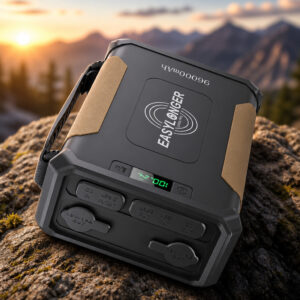
Battery for CPAP Machine While Camping: ES960 PRO
The ES960 PRO is an external CPAP battery with a rated 297.6Wh LiFePO4 pack. It weighs about 6.6 lb and powers supported CPAP machines through the DC cables in the box. EASYLONGER built it for camping, RV trips and power outages.
This page contains affiliate links. We may earn a commission if you buy through them, at no extra cost to you.
Will This Battery Work With Your CPAP?
EASYLONGER lists four DC cables in the box. They cover ResMed AirSense 11, AirCurve 11 and AirMini; ResMed AirSense 10 and AirCurve 10; Philips DreamStation and DreamStation 2; and Luna TravelPAP. Run this quick check before you buy.
Compatibility is model-specific; do not rely on the brand name alone. Luna G3, Transcend Micro and Prisma need a separate cable, and EASYLONGER says heated tubing on the Luna G3 is not supported with this battery. An S9 cable is not on the current included list. The manual also excludes life-support and critical medical use.
EASYLONGER ES960 PRO Specifications
| Property | Detail |
|---|---|
| Brand / model | EASYLONGER ES960 PRO (pack model GP50 PRO) |
| Type | External rechargeable CPAP battery with DC output |
| Chemistry | Lithium iron phosphate (LiFePO4) |
| Rated capacity | 297.6Wh (96,000mAh at 3.1V, or 24,000mAh at 12.4V) |
| Weight | About 6.6 lb (3,000 g) |
| Size | 8.86 × 6.2 × 3 in (maker’s website) |
| Adjustable DC output | 12V, 19V or 24V; remembers the last voltage used |
| DC output ratings (manual) | 12V/6.7A, 19V/3.8A, 24V/3.8A |
| USB-C port | Up to 100W output for compatible devices |
| USB-A ports | 2 ports |
| 12V vehicle-style sockets | 2 sockets, rated 12V/15A |
| Wireless charging | Up to 15W for compatible devices |
| Household AC outlet | None shown in the documented ports |
| Pass-through charging | Supported |
| Recharge options | Wall adapter (included), compatible vehicle charging, compatible solar, USB-C |
| DC charging input | 12–24V, 4A, 5.5 × 2.1 mm connector |
| Wall recharge time | About 5 hours (website); 5–6 hours (manual) |
| Operating temperature | 0°C to 45°C (32°F to 113°F) |
| Charging temperature | 0°C to 45°C; do not charge outside this range |
| Storage | −10°C to 45°C under one month; 0°C to 35°C longer; keep at about 60–80% charge |
| Cycle life | 3,000+ cycles (maker’s current claim) |
| In the box | Battery, AC adapter, USB-C cable, carry bag, manual, 4 DC cables |
| Warranty | Maker lists 5 years for direct orders and 3 years via authorized sellers, extendable to 5 with registration; terms vary by purchase |
| Air travel | 297.6Wh is above the FAA 160Wh limit for passenger baggage |
Figures come from EASYLONGER’s product pages and ES960 PRO manual, treat them as maker ratings. The manual lists slightly different dimensions and a lower cycle-life figure.
CPAP Battery Replacement Difficulty
Swapping your old external battery for the ES960 PRO is a low-difficulty job on a supported machine. It uses an external cable and a voltage setting, with no tools and no opening of any case. Most of the effort goes into checking fit and runtime. Tap a slice to highlight it.
- 20% Connecting the cable & setting voltage
- 10% Planning how to recharge
- 40% Confirming compatibility & voltage
- 30% Testing runtime with your settings
EASYLONGER does not document a way for users to replace the ES960 PRO’s internal cells. The manual prohibits disassembly, and the warranty excludes opening, repairing or modifying the battery. If it fails, contact EASYLONGER support.
The difficulty score and effort split are an editorial estimate, not an official rating. Unlisted CPAP machines need a fit check with EASYLONGER support first.
How to Swap In the ES960 PRO
These steps replace an old external CPAP battery or power adapter with the ES960 PRO. Tap each step to tick it off as you go.
- 1Confirm your machine and voltageFind your exact CPAP model and its matching cable. The manual lists 24V for ResMed AirSense, AirCurve and AirMini, and 12V for DreamStation and DreamStation 2. Check the manual for Luna.
- 2Charge and inspect the batteryCheck the battery, charger and cables for damage, then charge it fully.
- 3Disconnect the old power sourceStop therapy and unplug the old external battery or power adapter from the machine.
- 4Turn on and set the voltagePress the power button. Hold the DC voltage button for about three seconds until the voltage flashes, then press to cycle through 12V, 19V and 24V. Stop on your machine’s voltage.
- 5Connect the matching cablePlug the right cable into the battery’s DC output and your CPAP power input. Confirm the machine powers up.
- 6Test a full night at homeUse your normal settings, including any humidifier or heated tube. Note the battery level in the morning, and plan your recharge from there.
The DC output may be off, the voltage may be wrong, or the cable may not match your machine. The display also turns off after about five minutes, press the power button to wake it. To switch the DC output off after use, hold the voltage button for about three seconds.
What the ES960 PRO Can Power
The list below follows EASYLONGER’s compatibility details and the manual. Confirm your exact model and its power needs first.
- ResMed AirSense 11Cable included, 24V
- ResMed AirCurve 11Cable included, 24V
- ResMed AirMiniCable included, 24V
- AirSense 10 / AirCurve 10Cable included, 24V
- Philips DreamStation / 2Cable included, 12V
- Luna TravelPAPCable included, check manual
- Luna G3Separate ESG3 cable
- Transcend MicroSeparate ESMC cable
- PrismaSeparate ESPR cable, confirm model
- Phones & tabletsUSB-A, USB-C or wireless
- USB-C laptopsUp to 100W, if the laptop supports it
- Portable car fridge12V socket, within ratings
- Other 12V accessoriesCheck connector and load
Runtime, Safety & Storage
EASYLONGER’s headline is about three 8-hour nights with a ResMed AirSense 10 at 6 cmH2O, humidifier and heated tube off (about 8.4W draw). That is a low-load estimate, not a guarantee. Heated humidification and tubing cut runtime, so always run your own full-night test.
You notice abnormal heat, a strange smell or swelling. Stop using the battery and contact EASYLONGER support. Do not open it.
- Never open or disassemble the battery.
- Keep it dry: no rain, snow or immersion.
- Use and charge it only from 0°C to 45°C.
- Do not pack it in passenger baggage; 297.6Wh is over the FAA 160Wh limit.
- For long storage, leave it at about 60–80% charge and recharge it periodically as the manual directs.
- Take an old battery to a battery collection point, not household trash.
ES960 PRO for CPAP Camping: FAQ
Is the ES960 PRO a battery that goes inside my CPAP machine?
No. It is an external battery that connects to the power input of your CPAP machine with a DC cable.
How many nights can the ES960 PRO run a CPAP?
EASYLONGER’s headline figure is about three 8-hour nights with a ResMed AirSense 10 at 6 cmH2O, with the humidifier and heated tube off. Real runtime depends on your machine, settings, heating and conditions.
Can I use a humidifier and heated tube on battery power?
Heated humidifiers and tubes add load and can shorten runtime a lot. EASYLONGER also states that heated tubing on the Luna G3 is not supported with this battery setup. Test your own settings at home first.
Which CPAP machines come with a matching cable?
The package lists four DC cables: ResMed AirSense 11, AirCurve 11 and AirMini; ResMed AirSense 10 and AirCurve 10; Philips DreamStation and DreamStation 2; and Luna TravelPAP.
Does it have a household AC outlet?
No built-in AC outlet is shown in the documented ports. It offers an adjustable DC output, USB-C, USB-A, two 12V sockets and wireless charging.
Can I recharge it with a solar panel?
Yes, with a compatible panel. The DC input takes 12-24V through a 5.5 x 2.1 mm connector, and USB-C solar charging is also documented. A panel is not included in the standard package.
Can I take it on a plane?
No. At 297.6Wh it is above the FAA’s 160Wh limit for this type of battery in passenger baggage.
Can I replace the cells inside the ES960 PRO?
Not as a user job. EASYLONGER does not publish a procedure for it, the manual prohibits disassembly, and the warranty excludes opening, repairing or modifying the battery. Contact EASYLONGER support if the battery fails.