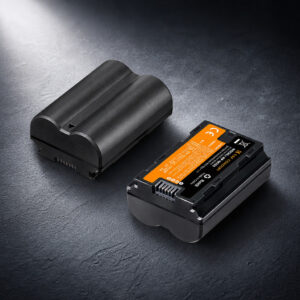
Fujifilm NP-W235 Rechargeable Li-ion Battery (K&F Concept 2200mAh)
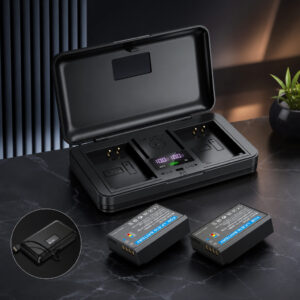
The K&F Concept NP-W235 is a third-party replacement for the Fujifilm NP-W235 camera battery. The kit comes with two rechargeable lithium-ion batteries and a dual-slot charger with USB-C and Micro-USB inputs.
This page contains affiliate links. We may earn a commission if you buy through them, at no extra cost to you.
Will This Battery Work in Your Camera?
K&F names the Fujifilm X-T4, X-T5, X-S20, X-H2, X-H2S, GFX100S and GFX50S II for this kit, plus the VG-XT4 grip. Other cameras use the NP-W235 format too, but K&F does not name them. Cameras with other Fujifilm batteries, such as the X-T50 and X-S10 (NP-W126S) or the GFX100 and GFX50S (NP-T125), do not take it. Run this quick check before you buy.
This is a third-party battery, not a Fujifilm product. Fujifilm’s manual advises using genuine Fujifilm rechargeable batteries designated for your camera. K&F says its battery is fully decoded, but that is a product claim and not a test result for every camera and firmware version.
K&F Concept NP-W235 Specifications
| Property | Detail |
|---|---|
| Brand / kit model | K&F Concept KF28.0018 (Amazon ASIN B0C1V8RST1) |
| Type | Third-party replacement for the Fujifilm NP-W235 battery format |
| Chemistry | Lithium-ion, rechargeable |
| Kit contents | 2 batteries, 2 protective covers, 1 dual-slot charger, 1 charging cable |
| Capacity (advertised) | 2200 mAh per battery |
| Voltage (listed) | 7.4 V |
| Battery size and weight | Not published in the sources reviewed |
| Charger inputs | USB-C and Micro-USB |
| Charger input rating | Listings show both 5V/1.2A and 5V/2.1A. K&F recommends a 5V/2.1A adapter. |
| Charger output, 1 battery | 8.4 V / 700 mA |
| Charger output, 2 batteries | 8.4 V / 500 mA (listing does not say if this is per slot) |
| Charge time (listed) | About 4.5 hours for two batteries |
| Charger display | LCD charging status |
| Charger size | 24 × 56 × 90 mm (Amazon listing) |
| Protection (advertised) | Over-charge, over-voltage, over-current and short-circuit protection |
| Fujifilm original: voltage | 7.2 V (reference) |
| Fujifilm original: capacity | 2350 mAh nominal, 2200 mAh rated |
| Fujifilm original: size and weight | 38.92 × 22.8 × 52.26 mm, about 79 g |
| Fujifilm original: temperature | 0°C to +40°C operating |
K&F figures are advertised by K&F and its Amazon listing, and have not been independently measured. The “Fujifilm original” rows come from Fujifilm’s manuals and describe the genuine battery, not the K&F one.
Fujifilm Battery Replacement Difficulty
Replacing the battery is a beginner-level job. It uses a door latch and a battery latch, with no tools, no screws and no disassembly. The only tricky part is buying a battery that fits your camera. Tap a slice to highlight it.
- 15% Opening the battery chamber
- 15% Swapping the battery
- 45% Choosing a compatible battery
- 25% Seating & checking power-on
Difficulty score and effort split are an editorial estimate based on Fujifilm’s documented battery-swap process, not an official rating. If a battery is stuck, leaking or deformed, do not force it. Contact your Fujifilm dealer instead.
How to Replace Your Fujifilm Battery
These steps follow Fujifilm’s X-T5 manual. Other bodies and grips may place the latches differently. Tap each step to tick it off as you go.
- 1Power off and open the chamberTurn the camera off. Slide the battery-chamber latch and open the cover. Fujifilm warns that opening it while the camera is on could damage image files or memory cards.
- 2Remove the old batteryPress the battery latch to the side and slide the installed battery out. It can be hot after use in high temperatures, so handle it with care.
- 3Insert the new batterySlide the charged NP-W235 in as shown in your camera manual until the latch holds it. Do not force it or insert it backwards.
- 4Close the cover and testClose and latch the chamber cover, then turn the camera on to confirm it powers up. If the cover will not close, recheck the battery direction.
Check that the battery is charged, inserted the right way round and that the chamber cover is latched.
Connect a USB power source to the charger’s USB-C or Micro-USB input, place the batteries in the slots and watch the LCD. K&F lists about 4.5 hours for two batteries and recommends a 5V/2.1A adapter. The Amazon listing does not include a wall adapter in the package contents. Dirty battery terminals can stop charging, wipe them with a clean, dry cloth.
Devices That Use an NP-W235
Fujifilm lists 11 cameras for the genuine NP-W235. K&F names only some of them for this kit, and that difference is marked on each card. Confirm the battery type in your device manual first.
- Fujifilm X-T4Listed by K&F
- Fujifilm X-T5Listed by K&F
- Fujifilm X-S20Listed by K&F
- Fujifilm X-H2Listed by K&F
- Fujifilm X-H2SListed by K&F
- Fujifilm GFX100SListed by K&F
- Fujifilm GFX50S IIListed by K&F
- Fujifilm GFX100 IINP-W235 per Fujifilm; not on K&F list
- Fujifilm GFX100S IINP-W235 per Fujifilm; not on K&F list
- Fujifilm GFX100RFNP-W235 per Fujifilm; not on K&F list
- Fujifilm GFX ETERNA 55NP-W235 per Fujifilm; not on K&F list
- VG-XT4 gripListed by K&F
- VG-XH gripTakes two NP-W235; not on K&F list
- FT-XH transmitterTakes two NP-W235; not on K&F list
- VG-GFX100 II gripTakes two NP-W235; not on K&F list
“Not on K&F list” means the device uses the NP-W235 format according to Fujifilm, but K&F does not name it for this kit.
Safety, Storage & Disposal
K&F advertises built-in protection, but an advertised feature is not a guarantee. Fujifilm says not to use batteries that show leaking, deformation, discoloration or other abnormalities, and not to disassemble or modify them.
- Never crush, open, short-circuit, heat or burn the battery.
- Keep spares in the camera or in a case, away from metal objects, with the terminal covers on.
- Do not force a stuck battery out of the camera. Contact your Fujifilm dealer.
- Cover the terminals of an old battery with insulation tape and follow your local disposal rules.
Fujifilm NP-W235 Battery: FAQ
Is the K&F Concept NP-W235 a genuine Fujifilm battery?
No. It is a K&F Concept third-party replacement for the Fujifilm NP-W235 battery format. Fujifilm’s manual advises using genuine Fujifilm rechargeable batteries designated for the camera.
Which cameras does K&F list for this kit?
K&F lists the Fujifilm X-T4, X-T5, X-S20, X-H2, X-H2S, GFX100S and GFX50S II, plus the VG-XT4 battery grip.
How long does the kit take to charge?
K&F lists about 4.5 hours for two batteries and recommends a 5V/2.1A USB adapter. Actual time depends on the starting charge and the power source.
Can I charge the battery directly with USB-C?
Not in this kit. The USB-C and Micro-USB inputs are on the dual-slot charger, not on the batteries. K&F sells a separate 2400mAh model with direct USB-C charging, and its charge time does not apply here.
Does it last as long as the original Fujifilm battery?
No verified, controlled comparison was found. Runtime depends on the camera, settings and temperature, and owner reports vary.
What should I do if my camera does not turn on after a battery change?
Check that the battery is charged, inserted the right way round, and that the chamber cover is latched.
How should I dispose of an old NP-W235 battery?
Cover the terminals with insulation tape and follow your local battery disposal or recycling rules. Do not put it in household trash.