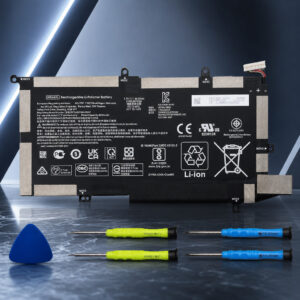
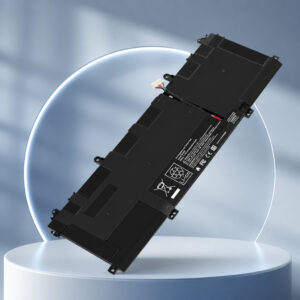
HP Spectre x360 15 Battery Replacement: SU06XL L29184-005
The SU06XL L29184-005 is an internal laptop battery listed for selected HP Spectre x360 15-df laptops. This Fancy Buying version is an aftermarket replacement with a listed capacity of 84.08Wh.
This page contains affiliate links. We may earn a commission if you buy through them, at no extra cost to you.
Will This Battery Fit Your Spectre x360 15?
This battery suits selected Spectre x360 15-df models only. HP says different notebook models need different batteries, and advises finding your product number before ordering. Run this quick check first.
“Spectre x360 15” covers several generations that use different batteries. For example, retail listings for 15-ch models show YB06XL, and a listing for the 15-bl000no shows a 79.2Wh battery. Match your full product number, not just the family name.
SU06XL L29184-005 Specifications
| Property | Detail |
|---|---|
| Brand / model | Fancy Buying SU06XL (HP spare part L29184-005) |
| Also listed as | SU06084XL, HSTNN-DB8W, L29048-271 |
| Battery type | Rechargeable. Listed as lithium polymer (HP lists its original as Li-ion) |
| Cells | 6-cell (HP original battery specification) |
| Listed energy | 84.08 Wh |
| Nominal voltage | 11.55 V (typical SU06XL rating) |
| Charge capacity | Usually listed as 7,280 mAh for SU06XL batteries. Some listings show 7,060 or 7,100 mAh |
| HP original battery | 6-cell, 84 Wh, Li-ion |
| Installation | Internal. Fitted after removing the bottom cover |
| Listed laptops | HP Spectre x360 15-df0xxx, 15-df1xxx, 15t-df000, 15t-df100 |
| Origin | Aftermarket replacement sold under the Fancy Buying brand |
The listing states 84.08Wh. Voltage and mAh are typical for SU06XL batteries and are not confirmed for this exact product. Check the battery label. Dimensions, weight, cell maker, safety certificates, cycle life and warranty were not verified.
Spectre x360 15 Battery Replacement Difficulty
This is a moderate job. The battery is internal. You need to open the bottom cover, handle a connector and work around speaker wiring. Tap a slice to highlight it.
- 25% Removing the bottom cover
- 25% Battery connector & wiring
- 30% Choosing the right battery
- 20% Refitting & testing
The score and effort split are an editorial estimate, not an official rating. HP’s service guide for this laptop is written for authorised service providers. A swollen or stuck battery raises the difficulty.
How to Replace Your Spectre x360 15 Battery
Tap each step to tick it off as you go. Screw positions can differ by model. Follow HP’s service guide for your exact laptop.
- 1Confirm the battery partFind your laptop’s product number on the label on its underside, or in HP Support Assistant. Check that it needs the SU06XL / L29184-005 battery, then compare the old and new batteries.
- 2Power down and unplugShut the laptop down and disconnect the charger and any accessories before opening it.
- 3Remove the bottom coverIn a 15-df1043dx teardown, two Torx T5 screws sit on the sides and more screws are hidden under the rubber feet. Remove them all, then release the cover clips gently with a plastic tool.
- 4Disconnect the batteryUnplug the battery connector from the system board. Use a plastic tool or a fingernail, not metal. Then free the speaker wiring routed around the battery.
- 5Swap the batteryRemove the battery screws (the same teardown shows six: four along the top and two along the bottom). Lift out the old battery and place the new one in the same position.
- 6Reassemble and testCheck that the speaker cables sit on top of the battery and the connector is the right way up. Refit the cover and screws, then charge the laptop and run the HP battery test.
Charge the battery fully first. Then disconnect the charger, turn the laptop on and press Esc repeatedly. Press F2 to open HP PC Hardware Diagnostics, then go to Component Tests, Power, Battery. Calibrate only if the test asks you to.
HP Laptops That Use the SU06XL
These models appear in SU06XL compatibility listings. The list is a sample. Confirm your exact product number. No other device type has been verified for this battery.
- 15-df0013dxSpectre x360 15-df0xxx
- 15-df0023dxSpectre x360 15-df0xxx
- 15-df0033dxSpectre x360 15-df0xxx
- 15-df0043dxSpectre x360 15-df0xxx
- 15-df1033dxSpectre x360 15-df1xxx
- 15-df1043dxSpectre x360 15-df1xxx
- 15-df0068nrSpectre x360 15-df0xxx
- 15-df0069nrSpectre x360 15-df0xxx
- 15-df0070nrSpectre x360 15-df0xxx
- 15-df1040nrSpectre x360 15-df1xxx
- 15-df1045nrSpectre x360 15-df1xxx
- 15-df1065nrSpectre x360 15-df1xxx
- 15-df1075nrSpectre x360 15-df1xxx
- 15-df0008caSpectre x360 15-df0xxx
- 15-df0010caSpectre x360 15-df0xxx
- 15-df1008caSpectre x360 15-df1xxx
- 15-df1010caSpectre x360 15-df1xxx
- 15-df1018caSpectre x360 15-df1xxx
- 15-df1020caSpectre x360 15-df1xxx
- 15-df0000txSpectre x360 15-df0xxx
- 15-df0001txSpectre x360 15-df0xxx
- 15-df0002txSpectre x360 15-df0xxx
- 15-df0003txSpectre x360 15-df0xxx
- 15-df1001txSpectre x360 15-df1xxx
- 15-df1024txSpectre x360 15-df1xxx
- 15t-df000Custom-build family
- 15t-df100Custom-build family
Safety & Disposal
If the battery is swollen or the case is bulging, stop using the laptop and disconnect the charger. HP advises replacing the battery before you use the laptop again.
- Never crush, puncture, disassemble or short-circuit the battery.
- Shut down and unplug the laptop before opening it.
- Keep old batteries out of household rubbish and recycling bins.
- Tape exposed terminals or bag each battery, then use a battery collection point.
SU06XL L29184-005: FAQ
Does the SU06XL battery fit every HP Spectre x360 15?
No. It is listed for selected Spectre x360 15-df laptops, including 15-df0xxx, 15-df1xxx, 15t-df000 and 15t-df100 models. Other Spectre x360 15 generations use different batteries. Check your full product number and required battery part before ordering.
Is this a genuine HP battery?
No. It is sold under the Fancy Buying brand as an aftermarket replacement, not as an HP product. HP recommends genuine HP replacement batteries from authorised dealers.
What do SU06XL and L29184-005 mean?
SU06XL is the battery model name. L29184-005 is the HP spare part number for this battery. Replacement listings also commonly cross-reference SU06084XL, HSTNN-DB8W and L29048-271.
Do I need to calibrate a new laptop battery?
Run HP’s battery test first. Calibrate only if the test result says it is needed. Calibration resets the charge gauge so Windows shows the level more accurately. It does not add capacity.
What if the laptop does not detect the new battery?
Follow HP’s battery-not-detected steps and run the HP battery test again. Windows can fail to detect a working battery. Also check the part match and the battery connector, especially if the problem began right after fitting.
What should I do if my battery is swollen?
Stop using the laptop and disconnect the charger. HP says swelling can deform the chassis and affect parts such as the touchpad, keyboard and display panel. Replace the battery before you use the laptop again.
How should I dispose of the old battery?
Do not put it in household rubbish or recycling bins. The US EPA says lithium-ion batteries should go to separate recycling or household hazardous waste collection points. Tape the terminals or bag each battery on its own. If a battery is damaged, ask its maker for handling advice.