Xbox Controller AA Rechargeable Battery: Mupoer Rechargeable AA Lithium
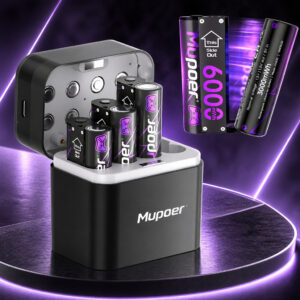
Running a standard Xbox Series X|S controller takes two AA batteries. Inside the Mupoer Rechargeable AA Lithium set are eight lithium-ion AA cells, advertised at 1.5V and 3000mWh apiece. Mupoer sells it for Xbox controllers that use AAs. Recharging the cells in the controller itself isn’t possible.
This page contains affiliate links. We may earn a commission if you buy through them, at no extra cost to you.
Will These Batteries Work in Your Xbox Controller?
Only controllers with a removable two-AA compartment can use this set. Microsoft’s Xbox Support notes that rechargeable AA (HR6) batteries are recommended for best performance. HR6 cells are NiMH, and Mupoer’s cells are advertised as lithium-ion. Run this quick check before you buy.
Microsoft’s Xbox Support notes that rechargeable AA batteries don’t charge in the controller. Mupoer’s compatibility, runtime and Blink statements are advertising claims, and this is a third-party product, not a Microsoft one.
Mupoer Rechargeable AA Lithium Specifications
| Property | Detail |
|---|---|
| Brand | Mupoer |
| Amazon listing ID (ASIN) | B0FRM5JMMN |
| Battery format | AA (double-A), rechargeable |
| Chemistry | Lithium-ion (as advertised by Mupoer) |
| Cells in the set | 8 AA batteries |
| Two-cell combinations | 4 pairs, advertised as 6000mWh controller packs |
| Output per AA | 1.5V (advertised) |
| Two AAs in the controller | 3V combined (2 × 1.5V) |
| Energy per AA | 3000mWh (advertised) |
| Energy per pair | 6000mWh (advertised) |
| Capacity in mAh | Not published. 3000mWh ÷ 1.5V works out to 2000mAh by calculation. |
| Runtime claim | Up to 48 hours of gaming per 6000mWh pair (Mupoer claim, no independent test found) |
| Charges inside controller | No. Charge outside the controller. |
| Not confirmed for this listing | Exact size and weight, charger rating, charge time, maximum current, temperature range, cycle life, certifications |
Figures are advertised ratings from Mupoer and the Amazon listing, not independent measurements. Mupoer sells other AA kits with different ratings. Check the label and leaflet in your own package.
Xbox Controller Battery Replacement Difficulty
Swapping AA batteries in a standard Xbox Series X|S controller is easy. It needs no tools and no controller disassembly, and the rear cover comes off with your fingers. The extra effort comes from picking compatible batteries and charging them outside the controller. Tap a slice to highlight it.
- 15% Opening the cover
- 15% Swapping the cells
- 40% Choosing compatible batteries
- 30% Charging outside the controller
Difficulty score and effort split are an editorial estimate, not an official rating from Microsoft, iFixit or Mupoer.
How to Replace the AA Batteries in Your Xbox Controller
This guide covers the standard Xbox Series X|S controller (model 1914). Tap each step to tick it off as you go.
- 1Charge the batteries firstRechargeable AAs do not charge inside the controller. Charge them outside it, using the charger and leaflet that came with your kit.
- 2Remove the battery coverTurn the controller over and slide the rear battery cover up and off with your fingers.
- 3Take out the old batteriesRemove both AA batteries from the compartment.
- 4Insert two charged AAsPlace the two batteries in the compartment and match the polarity markings. Do not force them.
- 5Refit the coverPut the battery cover back on, then power on the controller to check it works.
Check that both cells are fully charged and sit the right way round, and that the cover is fully closed. If the controller still does not turn on, follow Microsoft’s Xbox Support page for controllers that will not connect or turn on.
Devices for These Batteries
Mupoer markets this set for Xbox controllers and lists remote-control cars and flashlights as other uses. Always confirm that your device manual allows rechargeable lithium-ion AA batteries.
- Xbox Series X|S controllerModel 1914, two AA batteries
- Xbox One wireless controllerAA battery models
- Remote-control carsAdvertised by Mupoer
- FlashlightsAdvertised by Mupoer
- Xbox Elite Series 2 and CoreInternal battery, no AAs
- Xbox Adaptive ControllerInternal battery, no AAs
- Blink camerasBlink specifies non-rechargeable lithium AAs
- Smoke detectors and doorbellsExcluded in Mupoer listings
Safety, Charging & Disposal
The US EPA advises contacting the battery or device manufacturer for specific handling information if a lithium-ion battery becomes damaged.
- Charge outside the controller, never in it.
- Use the charger supplied with the kit or one stated as compatible with these cells.
- Keep worn-out lithium-ion batteries out of household trash and recycling bins.
- Place each battery in its own bag and tape the terminals, then take them to a battery recycler or hazardous-waste collection.
Xbox Controller AA Rechargeable Battery: FAQ
Can I use Mupoer rechargeable AA batteries in an Xbox controller?
Mupoer markets this set for AA-powered Xbox controllers, and a standard Xbox Series X|S controller uses two AA batteries. It is a third-party option. Microsoft’s Xbox Support notes that rechargeable AA (HR6) batteries are recommended for best performance. HR6 cells are NiMH, while Mupoer’s cells are advertised as lithium-ion.
Can I charge the batteries while they are in the controller?
No. Rechargeable AA batteries do not charge inside an Xbox controller. Take them out and charge them with a suitable charger.
Is this the same as the Xbox Play & Charge Kit?
No. This is a set of removable AA batteries. The Play & Charge Kit uses a dedicated rechargeable battery pack.
Does it work with the Xbox Elite Series 2 or Adaptive Controller?
No. Those controllers have an internal rechargeable battery and do not use AA batteries.
Does 3000mWh mean 3000mAh?
No. mWh measures energy and mAh measures charge. At 1.5V, 3000mWh equals 2000mAh by calculation, but this is an advertised rating and not a measured result.
How long do they last in an Xbox controller?
Mupoer claims up to 48 hours. Runtime depends on the controller, how much you use vibration and the battery condition. No independent test of this exact listing was found.
Can I use them in a Blink camera?
Mupoer advertises some Blink use, but Blink specifies AA 1.5V non-rechargeable lithium batteries for its battery-powered cameras. Follow Blink’s guidance.
How should I dispose of worn-out batteries?
The US EPA says lithium-ion batteries should not go in household trash or recycling bins. Place each battery in its own bag and tape the terminals, then take it to a battery recycler or hazardous-waste collection. Follow local rules outside the US.