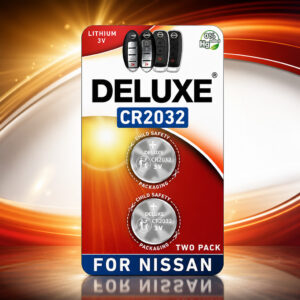
2014 Nissan Altima Key Fob Battery: CR2032
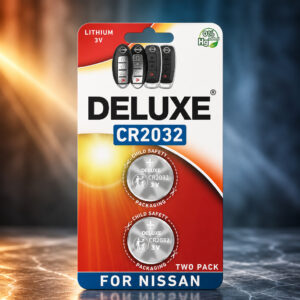
The original Intelligent Key for the 2014 Nissan Altima uses one CR2032 3V lithium coin battery. The Deluxe pack is listed as two CR2032 cells, and the swap takes a small screwdriver and no programming.
This page contains affiliate links. We may earn a commission if you buy through them, at no extra cost to you.
Will This Battery Work in Your Altima Key Fob?
Nissan lists a CR2032 or equivalent for the original 2014 Altima Intelligent Key. Run this quick check before you order.
The battery is not for standard Nissan keys that have a key blade sticking out of the fob. Aftermarket replacement fobs can also differ from the original. Read the marking on your own battery.
Deluxe CR2032 Specifications
| Property | Detail |
|---|---|
| Brand | Deluxe Batteries |
| Model | CR2032 (Amazon ASIN B0D5J894WM) |
| Pack contents | 2 batteries; key fob not included |
| Chemistry | Lithium / manganese dioxide (standard for CR2032), non-rechargeable |
| Nominal voltage | 3 V |
| Use type | Single-use |
| Dimensions (standard CR2032) | 20 mm diameter × 3.2 mm thick |
| Capacity | Not published for this product; Panasonic rates its CR2032 at 225 mAh and Maxell at 220 mAh |
| Weight, temperature range, shelf life | Not published for this product |
| Cells needed per fob | 1 (original 2014 Altima Intelligent Key) |
| Nissan battery spec | CR2032 or equivalent |
| Programming after swap | None listed in Nissan’s procedure |
| Fitment | Listed for Nissan smart remotes, including Altima 2007–2024; match your fob to the listing’s fitment guide |
Capacity depends on load, temperature and device cutoff voltage. Values marked “not published” were not found in the sources checked; brand datasheet figures are therefore not applied to Deluxe.
2014 Altima Key Fob Battery Replacement Difficulty
This is an easy job. You need a small flathead screwdriver and a thin cloth. The parts that need the most care are opening the plastic case without scratching it and getting the battery direction right. Tap a slice to highlight it.
- 35% Opening the case
- 25% Swapping the cell & checking direction
- 20% Choosing a compatible battery
- 20% Closing the case & testing
Difficulty score and effort split are an editorial estimate based on Nissan’s documented procedure, not an official rating. No programming step is listed for a normal battery swap.
How to Replace Your 2014 Altima Key Fob Battery
Tap each step to tick it off as you go. These steps cover the original-style Intelligent Key.
- 1Remove the mechanical keySlide the release catch on the back of the fob and pull out the metal key. Set it aside.
- 2Open the caseCover the tip of a small flathead screwdriver or the casing with a thin cloth. Insert the screwdriver into a notch where the key sat and twist gently to split the two halves. Try the other notch if needed.
- 3Remove the old batteryLift out the old CR2032. Hold it by the edges and avoid touching the circuit board or bending the contacts. Keep it away from children and pets.
- 4Insert the new CR2032Fit the new battery with the positive (+) side facing the bottom of the case. In the rear cover, the negative (−) side faces you.
- 5Close the caseLine up the two halves and press them together until the seam is flush. Slide the mechanical key back in.
- 6Test the fobStand near the car and press the lock and unlock buttons.
Check that the new battery is a CR2032, that the positive (+) side faces the bottom of the case, and that the case is fully closed. The generic steps on the Amazon listing say positive side up; for this key, follow Nissan’s direction instead. If the buttons still do nothing, contact a Nissan dealer.
Other Devices That Use a CR2032
CR2032 is a common coin cell format, not a Nissan-only part. Confirm the battery type in your device manual first. These examples are not tested with the Deluxe pack.
- Car key fobsCheck your fob’s battery marking
- Remote controlsCompact remotes that list CR2032
- Flameless candlesLED tea lights
- ToysCheck the battery compartment
- Smart metersListed by Panasonic for this use
- Digital thermometersCheck your manual
- Glucose monitorsCheck your manual
- Apple AirTagSee the AirTag note below
- Memory backupDevices with a backup cell
Apple specifies a CR2032 for AirTag and says some bitterant-coated CR2032 batteries may not work with it. Deluxe compatibility with AirTag has not been confirmed; check the pack for an AirTag compatibility mark.
Safety & Disposal
A swallowed coin battery can burn through a child’s throat or esophagus in as little as two hours. Keep new and used cells away from children. If you suspect ingestion, get emergency medical help immediately. In the U.S., call the National Battery Ingestion Hotline at 800-498-8666 or the Poison Help Line at 800-222-1222.
- Never recharge, crush, open, short-circuit or burn it.
- Hold the battery by its edges when you swap it.
- Keep used cells out of household trash and recycling bins.
- Tape the terminals or bag each cell, then use a battery collection point.
2014 Altima Key Fob Battery: FAQ
What battery does a 2014 Nissan Altima key fob take?
The original Intelligent Key for the 2014 Altima sedan uses one CR2032 battery. Nissan’s owner’s manual lists it as CR2032 or equivalent.
Will the Deluxe CR2032 fit my Altima key fob?
The Deluxe pack is listed as CR2032 3V, which matches the battery type Nissan specifies for the original key. Check your own fob and the fitment guide on the Amazon listing, especially if your key is an aftermarket replacement.
How many batteries does the fob need?
One. The Deluxe pack contains two cells, leaving one for a spare or another compatible device.
Which side of the battery faces the bottom of the case?
Nissan says the positive (+) side faces the bottom of the case. The generic steps on the Amazon listing say positive side up, which conflicts with Nissan’s wording for this key. Follow Nissan’s instruction.
Do I need to reprogram the key after changing the battery?
Nissan’s battery replacement procedure ends with testing the buttons and has no programming step. The Amazon listing also says no programming is required.
Can I use a CR2025 or CR2016 instead?
No. They share the 20mm diameter but are thinner (CR2025 is 2.5mm, CR2016 is 1.6mm) and have lower rated capacity in Panasonic’s lineup. Nissan specifies CR2032.
How long will the battery last in the fob?
No installed-life figure is published for this Deluxe product, and runtime depends on how often you use the fob. Nissan tells owners to replace the battery as soon as the low key battery warning appears.
Is the Deluxe CR2032 rechargeable?
No. The Amazon listing shows it as single-use, and conventional CR2032 cells are primary lithium cells that must not be recharged.
Is it a genuine Nissan battery?
Nissan endorsement has not been confirmed. The Amazon listing claims the cells come from the same manufacturer Nissan uses, and no supporting documentation was found. What is confirmed is the matching battery type: CR2032 3V.
Can I start the car if the fob battery is dead?
Nissan’s backup method: shift to P, press the brake firmly, touch the ignition switch with the Intelligent Key until a chime sounds, then push the ignition switch within 10 seconds while holding the brake.
How should I dispose of a used CR2032?
Do not put it in household trash or recycling bins. Tape the terminals or bag each cell individually and take it to a battery collection or hazardous-waste service. Keep used cells away from children.