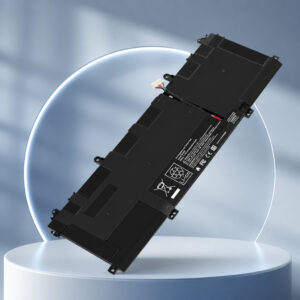
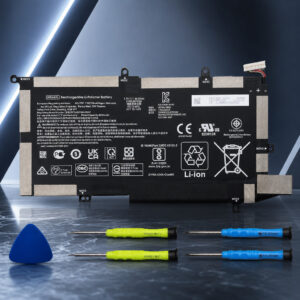
HP Spectre x360 14 Battery Replacement: OUWEE WS04XL
The OUWEE WS04XL is a third-party replacement battery marketed for selected HP Spectre x360 14-ea models. HP’s service manual lists a 4-cell, 66 Wh battery for this laptop family. The swap is an internal job that needs small screwdrivers and some care.
This page contains affiliate links. We may earn a commission if you buy through them, at no extra cost to you.
Will This Battery Work in Your Laptop?
“Spectre x360 14” is not enough to pick a battery. HP uses different batteries across generations, so match your exact model before you buy. Run this quick check first.
The 14-eu0xxx generation uses a different 4-cell, 68 Wh battery, which makes it a poor match. HP’s service guide also advises using the battery supplied with the computer, an HP replacement, or a compatible battery bought from HP. The OUWEE WS04XL is a third-party option, not an HP-approved part.
OUWEE WS04XL Specifications
| Property | Detail |
|---|---|
| Brand / model | OUWEE WS04XL (also written WSO4XL in listings) |
| Type | Third-party internal replacement laptop battery |
| Models named in the listing | HP Spectre x360 14t-ea000, 14-ea0378ng, 14-ea0023dx, 14-ea0047nr |
| HP original battery | 4-cell, 66 Wh (HP Spectre x360 14 service manual) |
| Commonly matched HP part number | L97357-005 |
| OUWEE voltage and capacity | Confirm on the battery label and product listing before buying |
| Installation | Internal, cable-connected, screw-secured |
| Reference teardown (14-ef0000) | 4 Torx cover screws, 6 Phillips battery screws |
| Cell maker, certifications, warranty | Not published in the sources reviewed. Check the listing. |
HP original-battery details describe HP’s own battery, not the OUWEE product. Screw counts come from a 14-ef0000 teardown and can differ on other models. Check your own model’s service guide.
HP Spectre x360 14 Battery Replacement Difficulty
This is a moderate job. The battery sits under the bottom cover and plugs in with a connector, with no soldering. The harder parts are the different screw types and opening the cover without damage. Tap a slice to highlight it.
- 30% Opening the bottom cover
- 25% Small screws & battery connector
- 30% Choosing a compatible battery
- 15% Installing & testing
Difficulty score and effort split are an editorial estimate based on a published teardown of a related model, not an official rating. Allow extra care if the old battery is swollen.
How to Replace Your Spectre x360 14 Battery
This is a general walkthrough based on a published 14-ef0000 teardown. Screw counts and cover layout can differ on your model, so check HP’s service guide for it. Tap each step to tick it off as you go.
- 1Prepare the laptopSave your work, shut the laptop down fully and unplug the charger and any accessories.
- 2Remove the cover screwsTurn the laptop over and take out all bottom cover screws. Keep them sorted by type.
- 3Release the bottom coverPry the cover off carefully with a plastic tool and lift it away.
- 4Unplug the battery connectorDisconnect the battery connector from the system board.
- 5Remove the old batteryTake out the screws that hold the battery, then lift it out of the chassis.
- 6Install the OUWEE WS04XLPlace the new battery in position, refit its screws and plug the connector back in.
- 7Refit the bottom coverPress the cover back into place and refit all its screws.
- 8Test the batteryPower on the laptop and run HP’s battery test to confirm the new battery is detected.
Shut down and unplug the charger, then reopen the laptop and check that the battery connector is fully seated. Run HP’s battery test again after reassembly.
Which Laptops Can Use This Battery?
The OUWEE listing names four models. Other laptops may share the same HP battery, but confirm your battery label before buying.
- Spectre x360 14t-ea000Named in the OUWEE listing
- Spectre x360 14-ea0378ngNamed in the OUWEE listing
- Spectre x360 14-ea0023dxNamed in the OUWEE listing
- Spectre x360 14-ea0047nrNamed in the OUWEE listing
- Other Spectre x360 14-ea modelsSame family. Confirm your battery label.
- Spectre x360 14-ef0xxx / 14t-ef00066 Wh battery reported. Confirm the part number.
- Pavilion Gaming 15-ec1025laNamed in the listing title. Not confirmed by HP.
- Spectre x360 14-eu0xxxUses a different 4-cell, 68 Wh battery
Safety, Calibration & Disposal
If the old battery is swollen, stop using the laptop until the battery is replaced, as HP advises. Do not press on, puncture or crush the battery.
- Shut down and unplug the charger before opening the laptop.
- Calibration only resets the charge gauge. It does not restore worn cells.
- Use a battery collection or recycling point for the old battery.
- Follow your local battery disposal rules.
OUWEE WS04XL: FAQ
What battery does the HP Spectre x360 14-ea use?
HP’s service manual lists a 4-cell, 66 Wh battery for the Spectre x360 14. The part number commonly matched to it is L97357-005.
Is the OUWEE WS04XL an original HP battery?
No. It is a third-party replacement battery marketed as compatible with selected HP Spectre x360 models.
Will it fit every HP Spectre x360 14?
No. The 14-eu0xxx generation uses a different 4-cell, 68 Wh battery. Check your full model and product number before buying.
Do I need to calibrate the new battery?
Calibration resets the battery gauge so the charge level shows accurately. HP suggests it when its battery test calls for it.
What should I do if my old battery is swollen?
Stop using the laptop until the battery is replaced, as HP advises. Do not puncture or crush the battery.
How should I dispose of the old battery?
Follow your local battery disposal rules and take it to a battery collection or recycling point.