Canon AE-1 Program Camera Battery: HQRP 6V 4LR44 2-Pack
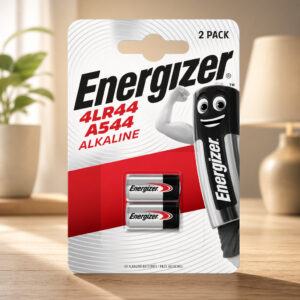
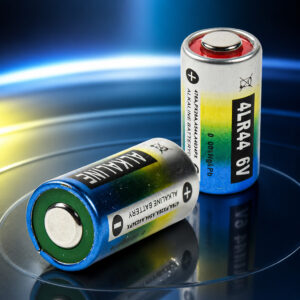
The Canon AE-1 Program runs on one 6V battery, and this HQRP 2-pack is a 6V alkaline replacement in the 4LR44 / A544 / PX28A family. Canon’s own manual lists the alkaline A544 / 4LR44 type as approved.
This page contains affiliate links. We may earn a commission if you buy through them, at no extra cost to you.
Will This Battery Work in the AE-1 Program?
Canon’s manual lists three 6V battery types for the AE-1 Program: alkaline A544 / 4LR44, silver oxide 544 / PX28 / 4SR44, and lithium PX28L. This HQRP pack is the alkaline type, and HQRP lists the AE-1 Program among its compatible cameras. Run this quick check before you buy.
This is an HQRP-branded replacement, not a Canon original.
HQRP 6V 4LR44 Battery Specifications
| Property | Detail |
|---|---|
| Brand | HQRP (third-party replacement, not Canon OEM) |
| Listing model / ASIN | 884667401101304 / B00AZIE1C0 |
| Pack size | 2 batteries |
| Battery codes | 4LR44, A544, V4034PX, PX28A |
| Chemistry | Alkaline, single-use (do not recharge) |
| Nominal voltage | 6 V per battery |
| Batteries needed in AE-1 Program | 1 |
| Format size (4LR44 type) | 12.0–13.0 mm diameter, 23.9–25.2 mm height |
| Capacity, weight, shelf life | Not published for this pack |
| Canon-approved types | Alkaline A544 / 4LR44, silver oxide 544 / PX28 / 4SR44, lithium PX28L |
| Battery life in camera (Canon) | About 1 year with normal use |
| Battery check (Canon) | 6 or more beeps per second = good; 3 or fewer = replace |
| Cold weather (Canon) | Extra battery precautions below 0°C / 32°F |
| Storage advice (Canon) | Remove the battery if the camera sits unused for about 3 weeks or more |
HQRP has not published capacity, weight or shelf life for this pack, and therefore none are listed here. The format size comes from the Energizer A544 datasheet for the same 4LR44 type. The one-year figure is Canon’s estimate for the camera, not a tested runtime for this battery.
AE-1 Program Battery Replacement Difficulty
This is an easy job. It needs no internal disassembly and no soldering. You only need a coin for the action grip, plus the viewfinder cover to open the battery chamber. The one thing to get right is the polarity. Tap a slice to highlight it.
- 20% Removing the action grip
- 25% Opening the battery chamber
- 35% Loading with correct polarity
- 20% Checking the beeps
The difficulty score and effort split are an editorial estimate based on Canon’s battery-loading procedure, not an official rating.
How to Replace Your AE-1 Program Battery
Tap each step to tick it off as you go.
- 1Set the main switch to LCanon uses this position to prevent accidental shutter release and battery drain.
- 2Remove the viewfinder cover and action gripSlide the viewfinder cover off the accessory shoe. Then remove the action grip with a coin or similar object.
- 3Open the battery chamberOpen the cover with the viewfinder cover, then take out the old battery.
- 4Clean the contactsWipe the battery terminals and the camera contacts with a clean, dry cloth.
- 5Load the new batteryFollow the diagram inside the chamber. Insert the negative end first, push down, then insert the positive end.
- 6Close up and testClose the cover and refit the grip. Set the main switch to A and press the battery check button for two to three seconds.
Canon says 6 or more beeps per second means the battery is good, and 3 or fewer means it is weak. If you hear nothing, check the polarity against the diagram, wipe the contacts again, and try a fresh battery.
Other Cameras That Use This Battery
HQRP lists these 11 film cameras for the pack. Canon’s manual confirms the AE-1 Program, and the Fujica AX-3 specs list the 4LR44 type. Check your own camera manual for the others.
- Canon AE-1 ProgramConfirmed in Canon manual
- Canon AE-1Listed by HQRP
- Canon A-1Listed by HQRP
- Canon AV-1Listed by HQRP
- Canon AT-1Listed by HQRP
- Fujica ST801Listed by HQRP
- Fujica ST901Listed by HQRP
- Fujica AX-34LR44 listed in specs
- Yashica 35 CCNListed by HQRP
- Yashica FX-1Listed by HQRP
- Yashica FR IIListed by HQRP
Battery Care, Storage & Disposal
Remove the battery if the camera will sit unused for about three weeks or more, as Canon advises. If a battery has leaked, wear gloves and eye protection and do not touch the residue with bare hands.
- Set the main switch to L when you are not shooting.
- Make sure nothing presses the shutter button, battery check button, exposure preview switch or AE lock switch while the camera is stored, because these controls use battery power.
- Never try to recharge this single-use alkaline battery.
- The EPA says alkaline batteries can go in household trash in most communities, but it recommends sending them to battery recyclers or checking with your local or state solid waste authority.
Canon AE-1 Program Battery: FAQ
What battery does the Canon AE-1 Program use?
It uses one 6V battery. Canon’s manual lists an alkaline A544 / 4LR44, a silver oxide 544 / PX28 / 4SR44 or a lithium PX28L.
Does the camera need one battery or two?
One. The HQRP pack contains two batteries, which gives you one for the camera and one spare.
How long does the battery last in the AE-1 Program?
Canon’s manual estimates about one year with normal use. That is a camera-level estimate, not a tested runtime for this HQRP battery.
Can I use a silver oxide or lithium battery instead?
Yes. Canon’s manual lists a 6V silver oxide 544 / PX28 / 4SR44 and a 6V lithium PX28L as approved options.
Can the AE-1 Program work without a battery?
No. Canon states that the AE-1 Program will not work without a battery.
What should I do if the camera does not respond after a battery change?
Check that the battery follows the polarity diagram inside the chamber, wipe the battery terminals and camera contacts with a dry cloth, set the main switch to A, and try a fresh battery.