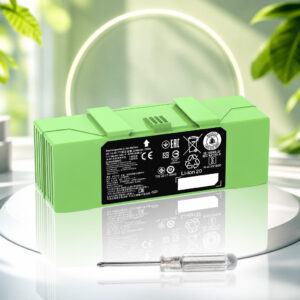
iRobot Roomba i7 Battery Replacement: ABL-F 75Wh
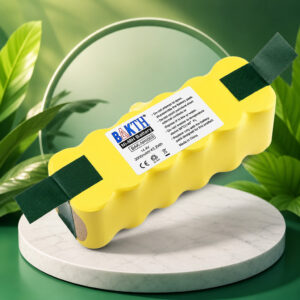
The Dentsing ABL-F 75Wh is a third-party lithium-ion replacement battery listed for the iRobot Roomba i7, i7+ and other selected e, i and j series robots. It is advertised at 14.4V and 5200mAh.
This page contains affiliate links. We may earn a commission if you buy through them, at no extra cost to you.
Will This Battery Work in Your Roomba?
Dentsing lists the ABL-F 75Wh for the Roomba i7 and i7+, plus several other e, i and j series models. That list comes from the product listing, not from iRobot. Run this quick check before you buy.
iRobot warns that aftermarket batteries can trigger charging errors, and it lists Charging Errors 17 and 23 as signs of a battery that may not be authentic. A model on Dentsing’s list is not a guarantee that your robot will accept the pack. Customer reviews on the listing report both working and failed installs.
Dentsing ABL-F 75Wh Specifications
| Property | Detail |
|---|---|
| Brand / model | Dentsing ABL-F (Amazon ASIN B0F42LYZG6) |
| Battery type | Third-party replacement battery, not iRobot-branded |
| Chemistry | Lithium-ion, rechargeable |
| Voltage | 14.4 V (advertised) |
| Capacity | 5200 mAh (advertised) |
| Energy | 75 Wh (advertised) |
| Color | Green |
| Advertised runtime | At least 120 minutes per charge (no test conditions published) |
| Advertised cycle life | Up to 1,000 charge cycles (no test method published) |
| Protection claims | Overcharge, overcurrent, overvoltage, overheating and short-circuit protection |
| Compliance claims | FCC, CE and RoHS listed (supporting documents not reviewed) |
| Warranty | 12 months (advertised by Dentsing) |
| Bare battery size and weight | Not published |
| Original i7 battery (iRobot SKU i715020) | 1800 mAh lithium-ion, part 4624864 |
All ABL-F values above are advertised figures and were not independently measured. The product page URL still carries a 4460mAh reference, while the listing text says 5200mAh. At 14.4V, 5200mAh works out to about 75Wh and 4460mAh to about 64.2Wh. That gap is why the label on the battery you receive matters.
Roomba i7 Battery Replacement Difficulty
The physical swap is easy. iFixit rates it easy and estimates about five minutes, using one Phillips #1 screwdriver. There is no soldering and no need to open the battery pack. The harder part is choosing a battery your robot accepts. Tap a slice to highlight it.
- 20% Removing the brush & cover
- 15% Swapping the battery
- 40% Choosing a compatible battery
- 25% Charging & recognition check
The difficulty score and effort split are an editorial estimate. The easy rating and five-minute time come from iFixit’s Roomba i7 battery guide. Charging time and any troubleshooting come on top.
How to Replace the Roomba i7 Battery
Tap each step to tick it off as you go. These steps match the Roomba i7 and i7+. Some other models use a different cover or a battery door.
- 1Power down and undockTurn the Roomba off and take it off its charging base.
- 2Flip the robot overPlace it upside down on a flat surface.
- 3Remove the edge-sweeping brushLoosen the center screw with a Phillips #1 screwdriver and lift the brush off.
- 4Remove the bottom coverLoosen the five cover screws and lift the cover away.
- 5Swap the batteryThe battery sits near the center, in front of the two rubber rollers. Release the clip, lift out the old battery and fit the new one the same way round. Do not force it.
- 6Refit the cover and brushThe cover must sit flush with the sensors. Tighten the screws and put the edge-sweeping brush back.
- 7Charge the robotReturn the Roomba to its base. Dentsing advises a full charge before the first cleaning run.
Charging Error 1 means the robot cannot sense the battery. Remove it and reinstall it so it is fully seated. If the light ring is off, press CLEAN once or check the app for the charge status. If the robot shows Error 17 or 23, iRobot suggests a reboot: hold CLEAN for about 20 seconds with the robot off the dock.
Other Roomba Models Listed for the ABL-F
Dentsing lists the models below. This is the listing’s own compatibility list, not an iRobot approval. iRobot assigns different batteries to some robots, such as the Combo j7+, which makes it important to confirm your exact model first.
- Roomba i7 / i7+7150, 7156, 7158, 7550, 7558
- Roomba i3 / i3+3150, 3158, 3550, 3556, 3558
- Roomba i4 / i4+4150, 4550, 4552
- Roomba i6Named in the listing
- Roomba i8 / i8+8550
- Roomba e55150, 5152, 5154, 5158
- Roomba e66198
- Roomba j7 / j7+Check Combo j7+ fit first
- Roomba j9 / j9+Named in the long description
Safety, Storage & Disposal
A swollen, cracked or hot lithium-ion battery is a fire risk. Do not charge it, and do not treat it as a routine swap. Contact the battery maker or a local hazardous-waste program for handling advice.
- Never pry into, puncture or squeeze the battery casing.
- Dentsing advises removing the battery for long periods of non-use and keeping it in a cool place.
- Keep old lithium-ion batteries out of household trash and recycling bins.
- Tape the terminals or bag each battery separately, then use a battery recycler or hazardous-waste collection point.
Roomba i7 Battery Replacement: FAQ
Does the Roomba i7 have a replaceable battery?
Yes. The battery sits under the bottom cover, near the center of the robot, and comes out after you release its retaining clip.
Is the Dentsing ABL-F an original iRobot battery?
No. It is a Dentsing-branded third-party replacement battery. It is not made or approved by iRobot.
Is the capacity 4460mAh or 5200mAh?
The current Amazon listing advertises 14.4V, 5200mAh and 75Wh, although the page URL still carries a 4460mAh reference. At 14.4V, 5200mAh equals about 75Wh and 4460mAh equals about 64.2Wh, which is why the label on the battery you receive is worth checking.
How long does the battery run?
Dentsing advertises at least 120 minutes per charge, but no test conditions or independent runtime test were found. Carpet, robot condition and real usable capacity all change the result.
What does Charging Error 1 mean?
iRobot says the robot cannot sense that a battery is installed. Remove the battery, reinstall it so it is fully seated, and contact iRobot Customer Care if the error stays.
What do Charging Errors 17 and 23 mean?
iRobot says these errors mean the battery may not be iRobot authentic, and that they can occur with aftermarket batteries. If the message persists, iRobot advises a reboot, which on an i series robot means holding the CLEAN button for about 20 seconds with the robot off the dock. A reboot does not guarantee that a third-party battery will be accepted.
Does a non-iRobot battery void my Roomba warranty?
iRobot’s battery compatibility page says parts not made by iRobot void the warranty, and its Limited Warranty excludes defects related to spare parts that iRobot does not provide or recommend. In the United States, FTC guidance says a warranty generally cannot be voided only because a third-party part was used, although damage caused by that part may be excluded. Check your warranty terms and local consumer law.
How should I dispose of the old battery?
Do not put it in household trash or recycling bins. Tape the terminals or bag each battery separately and take it to a battery recycler or hazardous-waste collection point.