Trijicon RMR Type 2 Battery Replacement
The LED versions of the Trijicon RMR Type 2 run on one CR2032 3V lithium coin cell. It is 20mm wide and 3.2mm thick, and the battery compartment sits on the underside of the sight. On a mounted RMR, the optic comes off the mount for each swap.
This page contains affiliate links. We may earn a commission if you buy through them, at no extra cost to you.
Will This Battery Work in an RMR Type 2?
Trijicon’s manual lists 3.0V CR2032 batteries only. Run this quick check on your pack and your sight before you fit the cell.
Trijicon names the CR2032 type but does not approve a specific brand or pack. For coated cells, Duracell’s datasheet advises device makers to keep battery contacts at least 3.2mm from the edge of the positive terminal. Confirm the dot lights after you fit the cell. The Dual-Illuminated RMR uses fibre optics and tritium and needs no battery.
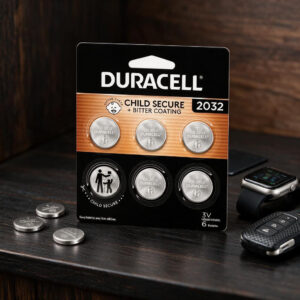
Duracell CR2032 Specifications
| Property | Detail |
|---|---|
| Brand / model | Duracell 2032 (CR2032, also listed as DL2032) |
| Chemistry | Lithium / manganese dioxide (Li/MnO₂), non-rechargeable |
| Nominal voltage | 3 V |
| Dimensions (standard CR2032) | 20 mm diameter × 3.2 mm thick |
| Batteries needed per RMR | 1 |
| Pack size (this listing) | 6 cells |
| Child-safety features | Non-toxic bitter coating (Duracell’s current page says both sides) and child-secure packaging |
| Storage life claim | Up to 10 years in storage (not in-device runtime) |
| Typical weight* | 2.8 g |
| Nominal capacity* | 255 mAh (15 kΩ load, 2.0 V cutoff) |
| Nominal energy* | 745 mWh |
| Standard continuous discharge* | 0.4 mA |
| Max continuous discharge* | 3 mA |
| Max pulse discharge* | 50 mA (1-second pulse) |
| Operating temperature* | −30°C to +70°C |
| Recommended storage* | 5°C to 30°C, humidity below 70% |
| Self-discharge* | Under 1% after 1 year at 20°C |
| Designed to meet* | IEC 60086-4, UN 38.3, REACH, ISO 9001 |
| RMR Automatic LED life | 2 years typical use; 5 years in dark storage (Trijicon) |
| RMR Adjustable LED life (red) | 4+ years continuous use at setting 4 of 8, at 70°F / 21°C (Trijicon) |
| RMR Adjustable LED life (green) | 2 years continuous use at setting 4 of 8, at 70°F / 21°C (Trijicon) |
| Trijicon replacement advice | Once a year, or sooner with frequent high brightness use |
| RMR mounting screw torque | 15 in-lbs (#6-32 flat-head screws) |
* Values from a Duracell CR2032 datasheet for a documented 255 mAh variant. Duracell lists other CR2032 versions (225 mAh, 245 mAh and 255 mAh). That means the exact figures for your pack may differ. Capacity also depends on load, temperature and device cutoff voltage. RMR life ratings come from Trijicon and apply to the sight, not to one battery brand.
RMR Type 2 Battery Replacement Difficulty
The cell swap is easy. The effort comes from access: the battery compartment is on the underside. A mounted sight therefore has to come off and go back on with the right screws and torque. There is no soldering or charging involved. Tap a slice to highlight it.
- 15% Fitting the cell
- 15% Choosing the battery
- 45% Removing & remounting the optic
- 25% Checking the dot & zero
The difficulty score and effort split are an editorial estimate, not an official Trijicon rating. Trijicon does not publish a completion time for the swap.
How to Replace Your RMR Type 2 Battery
Tap each step to tick it off as you go.
- 1Make the firearm safeMake sure the firearm is unloaded. Remove the magazine, clear the chamber and check it before you touch the optic.
- 2Remove the opticTake out the two mounting screws with the driver that fits your screws, then lift the RMR off its mount to reach the battery compartment.
- 3Remove the old batteryCarefully lift out the used CR2032. Inspect the new battery and the compartment for corrosion or damage. Keep the old cell away from children.
- 4Insert the new CR2032Fit the cell with the negative (−) side down, as marked on the contact (see Figures 3 and 4 in Trijicon’s manual). Slide it in from front to rear. Forcing it can bend the contacts.
- 5Check the dotConfirm the sight works before you reassemble. On the Adjustable LED model, press either side button. Settings 1 and 2 are for night vision and are not visible to the naked eye. The Automatic LED model powers up on its own.
- 6Refit the opticAlign the holes, press the sight down until it sits flush, and tighten the two screws to 15 in-lbs. Trijicon’s torque page asks for a nylon patch or a drop of medium-strength thread locker on clean threads, except where the interface has steel inserts in aluminium. The battery may sit about 0.020 in proud of the base by design. Trijicon recommends its RM63 sealing plate for a waterproof seal up to 66 ft.
- 7Confirm zero and dispose of the old cellChecking your zero before you rely on the sight is our advice, not a Trijicon requirement. Recycle the used battery under local rules.
Check the polarity against the contact marking, make sure the contacts are not bent, and press a button on the Adjustable LED model. If a fresh, correctly fitted cell still gives no dot, contact Trijicon Customer Service.
Other Devices That Use a CR2032
Duracell lists the 2032 for many small electronics. Confirm the battery type in your device manual first.
- Trijicon RMR Type 2Automatic LED (RM01 series)
- Trijicon RMR Type 2Adjustable LED (RM06, RM07, RM09)
- Other Trijicon opticsRMRcc, RMR HD, SRO (not the same procedure)
- Apple AirTagPositive side up; look for AirTag-compatible packs
- Car key fobsCheck your manual
- Fitness devicesCheck your manual
- Remote controlsCheck your manual
- CalculatorsCheck your manual
- WatchesCheck your manual
- Flameless candlesCheck your manual
- Wireless sensorsCheck your manual
- Wireless camerasCheck your manual
- Glucose monitorsCheck your manual
- ThermometersCheck your manual
Safety, Storage & Disposal
A swallowed coin battery can cause internal chemical burns in as little as two hours. Bitter coating is designed to discourage swallowing, but it does not remove the hazard. Seek immediate medical attention if you suspect a battery was swallowed or inserted into any part of the body.
- Never recharge, crush, disassemble, short-circuit or burn it.
- Store it clean, cool and dry, preferably at 30°C or below.
- Keep new and used cells away from children.
- Recycle or dispose of used cells under local rules, not in household trash.
RMR Type 2 Battery: FAQ
What battery does the Trijicon RMR Type 2 use?
The Automatic LED and Adjustable LED versions use one CR2032 lithium coin battery. Trijicon’s manual states that the optic is compatible with 3.0V CR2032 batteries only.
Do I need to remove the RMR Type 2 to change the battery?
Yes. The battery compartment is on the underside of the sight. If the RMR is on a mount, you remove the two mounting screws and lift the sight off before taking out the old cell.
How often should I replace the battery?
Trijicon recommends replacing the battery once a year, or more often if you use the higher brightness settings frequently.
How long does the battery last in an RMR Type 2?
Trijicon rates the Automatic LED at 2 years of typical use (5 years in dark storage), the red Adjustable LED at 4+ years of continuous use at setting 4 of 8, and the green Adjustable LED at 2 years at the same setting. These ratings apply at 70°F (21°C). Extreme temperatures and higher brightness settings shorten battery life.
Is the Duracell 2032 compatible with the RMR Type 2?
It matches the battery type Trijicon specifies: a 3V CR2032 lithium coin cell. Trijicon does not name a brand or approve this specific pack. Check that the dot lights after you fit the cell.
Does the 10-year Duracell claim mean 10 years inside the sight?
No. The 10-year figure is Duracell’s storage guarantee. Runtime inside the RMR follows Trijicon’s ratings and depends on brightness setting and temperature.
Is the CR2032 rechargeable?
No. The Duracell CR2032 is a single-use lithium / manganese dioxide cell, and Duracell warns against recharging it.
Can I use a CR2025 or CR2016 instead?
No. Trijicon specifies CR2032 batteries only.
Do I need to re-zero the sight after a battery change?
Trijicon’s manual asks for a re-zero when the RMR moves to a different firearm. It does not say a battery change shifts zero, and it does not promise zero stays the same. Because the sight comes off and goes back on, checking your zero before you rely on it is sensible.
What should I do if the dot does not light after the change?
Check the polarity against the marking on the contact, because a wrongly fitted battery can bend the contacts. On the Adjustable LED model, press a button to wake the sight. Brightness settings 1 and 2 are for night vision devices and are not visible to the naked eye. If a fresh, correctly fitted battery still gives no dot, contact Trijicon Customer Service.
How should I dispose of a used CR2032?
Recycle it or dispose of it under local regulations, and keep it away from children. Trijicon says not to put batteries in household trash or burn them.